
A landing page is one of the most effective tools in digital marketing — a single page designed for one purpose: getting visitors to take one specific action, without the distraction of a sprawling navigation menu like on a regular website. Whether you call it a landing page, web landing page, or landing page website, the core concept is the same: a focused page built to turn visitors into leads or customers.
Quick summary: a landing page is a standalone page with one conversion goal (signing up, buying, downloading, or joining an event), without navigation that distracts visitors' attention. Unlike a website, which has many pages for many purposes, a landing page is deliberately kept narrow in focus so its conversion rate stays higher. This guide covers the definition, types, key elements, structure, and how to build a landing page that actually works.
Table of Contents
- What Is a Landing Page?
- Landing Page vs Website: What's the Difference?
- Types of Landing Pages You Should Know
- 1. Lead Generation Landing Page
- 2. Click-Through Landing Page
- 3. Product Launch Landing Page
- 4. Event or Webinar Registration Landing Page
- 5. Promo or Discount Landing Page
- 6. Squeeze Page
- When You Need a Landing Page
- High-Converting Landing Page Elements
- 1. A Headline That Immediately Explains the Main Benefit
- 2. A Sub-Headline That Clarifies the Target Audience
- 3. Supporting Visual
- 4. Benefit Points That Are Clear and Easy to Scan
- 5. Social Proof
- 6. One Clear, Prominent Call-to-Action
- Anatomy of an Effective Landing Page
- How to Build a Landing Page
- Step 1: Define the Goal and Target Audience
- Step 2: Research Competitors and Landing Page Examples
- Step 3: Write the Copy Before the Design
- Step 4: Choose a Platform or Builder
- Step 5: Design and Arrange Elements According to the Anatomy
- Step 6: Set Up Tracking and Analytics
- Step 7: Test Before Publishing
- Step 8: Continuous Optimization
- Landing Page Examples by Goal
- Common Mistakes That Lower Landing Page Conversion
- Landing Pages and SEO: Necessary or Not?
- Conclusion
- Frequently Asked Questions
What Is a Landing Page?

A landing page is a standalone web page designed for one specific conversion goal — signing up, buying, downloading, or registering for an event. Unlike a main website, which has many pages and purposes, a landing page is deliberately built to be focused and low-distraction: there's no navigation menu directing visitors to other pages, no links unrelated to the conversion goal, and every element on the page — headline, images, text, down to the button — points toward the same single call to action.
The terms web landing page and landing page website are often used interchangeably to refer to the same thing: the first "landing" page a visitor sees after clicking an ad, a social media link, or a marketing email. The name "landing" itself comes from this page's function as the point where visitors land from a specific traffic source — not a page they stumble on through free browsing around the website.
A simple example: a SaaS business runs a Google Ads campaign for their new feature. Instead of sending ad clicks to a homepage full of menus and general information, they build one dedicated page that only covers that feature — complete with benefits, a short demo, and one "Try Free for 14 Days" button. This page is what's called a landing page.
If you want to understand the concept of what a landing page is in more depth — including the history of the term and how it's used across digital marketing strategy — read a more detailed explanation in our what is a landing page guide.
Landing Page vs Website: What's the Difference?
This is a question that often confuses beginners, especially since technically a landing page is also a "website page." The difference isn't in the technology used, but in the purpose and structure.
Aspect | Landing Page | Website |
|---|---|---|
Goal | One specific conversion goal | Many goals (information, profile, contact, etc.) |
Navigation | Minimal or no navigation menu | Has a full menu to various pages |
Number of pages | Usually one standalone page | Consists of many interlinked pages |
Traffic source | Ads, email, social media, campaigns | Organic search, direct visits, referrals |
Content focus | Very specific to one offer | Broader, covering the whole business |
Lifecycle | Often built for a specific campaign, can be taken down once it's over | Permanent as the business's digital identity |
In short: a website has many pages for various purposes (profile, services, blog, contact), while a landing page focuses on one specific conversion goal, usually in support of a particular campaign. A website is your business's overall digital "home," while a landing page is the "front door" designed for a specific moment and audience.
That doesn't mean you have to pick one or the other — most businesses that run serious campaigns actually use both at once: a website as the long-term foundation, and landing pages as campaign-support pages that can be built and torn down as needed. You can read a more complete comparison in our landing page vs website guide.
Types of Landing Pages You Should Know
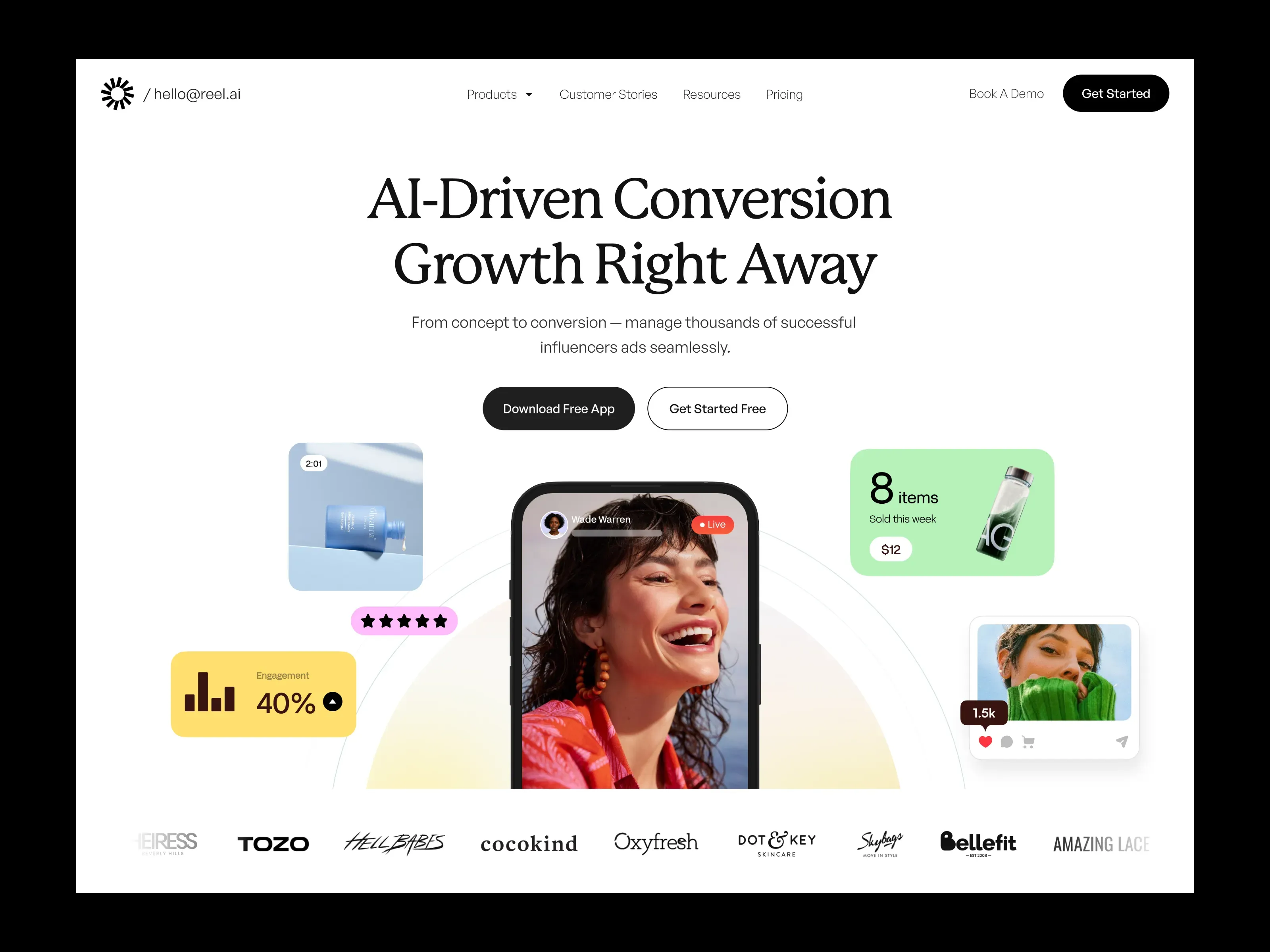
Not every landing page is built for the same purpose. Recognizing the type will help you decide on the right structure and elements from the start.
1. Lead Generation Landing Page
This type aims to collect prospective customer data — usually name, email, or phone number — in exchange for something of value, like a free ebook, a consultation, or a product demo. The form is the main element, usually placed somewhere clearly visible without much scrolling.
2. Click-Through Landing Page
This type has no form at all — its only goal is to warm up prospective buyers before directing them to a transaction page, such as a checkout or cart page. Often used by e-commerce businesses that want to give extra context before visitors buy.
3. Product Launch Landing Page
Used when a business launches a new product or service. It focuses on explaining the product's benefits in depth, often complete with a demo video, specifications, and an early-bird offer to drive quick action.
4. Event or Webinar Registration Landing Page
Its main focus is the registration form, complete with schedule information, speakers, and the benefits of attending. Urgency elements like a countdown are often used to drive faster sign-ups.
5. Promo or Discount Landing Page
Used for seasonal sales campaigns or limited-time discounts. The page structure is usually shorter, immediately highlighting the discount size and the deadline.
6. Squeeze Page
The most minimalist version of a landing page, usually containing just a short headline and a single email field to build an email list as fast as possible, without much additional explanation.
Knowing which type of landing page fits your campaign goal will heavily influence your next decisions, from page length to how many elements you need to display.
When You Need a Landing Page
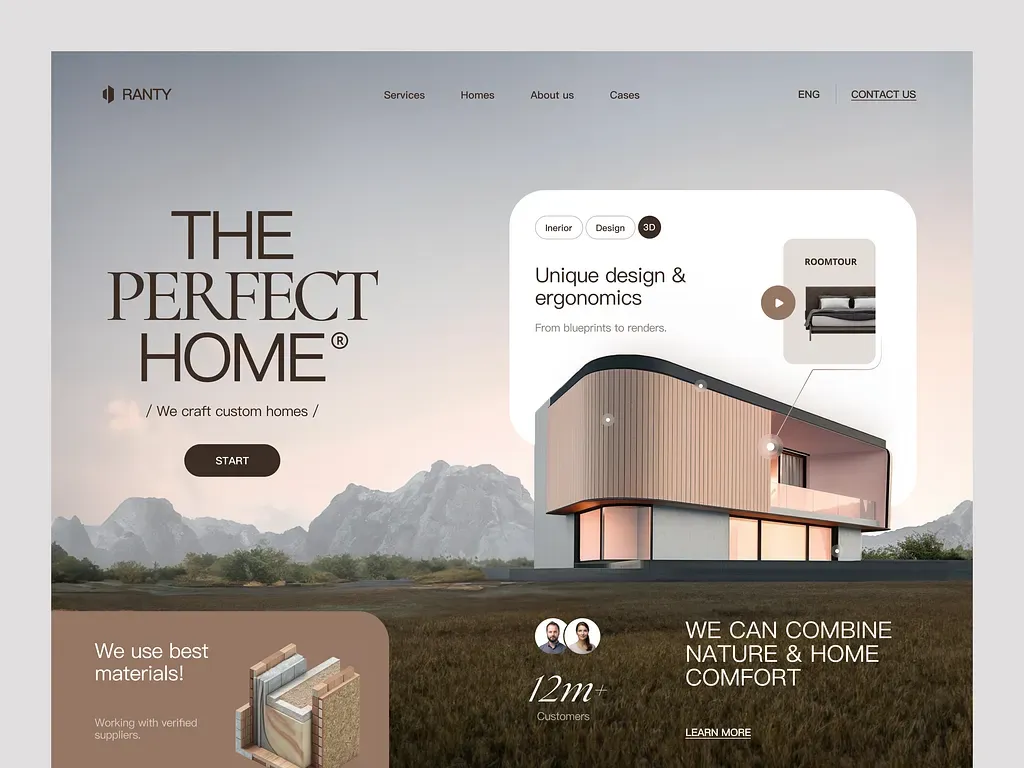
A landing page isn't something every business always needs — it works best for specific moments and goals:
- Launching a new product or service and wanting to gauge market interest before making a bigger investment. A landing page lets you test your marketing message with limited traffic first.
- Running an ad campaign (Google Ads, Meta Ads, TikTok Ads) and needing a focused destination page. Sending paid ads to a homepage full of distractions usually results in a much lower conversion rate than a dedicated landing page.
- Collecting sign-ups for a webinar, event, or early access to a product that hasn't officially launched yet.
- Offering a special promo or discount during a limited period, where speed and message clarity matter far more than complete business information.
- Testing a new business idea (market validation) before building the product in full — many startups use a simple landing page to gauge interest before spending resources on building the actual product.
- Seasonal or specially-themed campaigns that are no longer relevant after a certain period, so they don't need to become a permanent part of the main website's structure.
If your needs fall outside the contexts above — for example, simply building a long-term digital presence or explaining your business profile thoroughly — a regular website is most likely the better answer over a single landing page.
High-Converting Landing Page Elements
A landing page that successfully converts visitors isn't the result of chance — there's a consistent pattern of elements that show up on high-performing landing pages.
1. A Headline That Immediately Explains the Main Benefit

The headline is the first element read, and it often determines whether visitors keep reading or leave immediately. An effective headline focuses on the main benefit for the visitor, not just a product name or a generic slogan. Compare "Finance Management App" with "Manage Your Business Finances Hassle-Free, Automatically Every Day" — the second immediately answers "what's in it for me."
2. A Sub-Headline That Clarifies the Target Audience
The sub-headline clarifies who the page is for and reinforces the promise made by the main headline. This section helps visitors confirm for themselves that they're a "fit" for the offer before continuing to read.
3. Supporting Visual
Product images, illustrations, or a short video help visitors understand the offer faster than text alone. For digital products, an interface screenshot or a short demo video is usually far more effective than a generic illustration.
4. Benefit Points That Are Clear and Easy to Scan
Most visitors don't read a landing page word for word — they scan the page to find relevant information as quickly as possible. Benefit points in bullet format, rather than long paragraphs, are much easier to take in within the first few seconds.
5. Social Proof
Customer testimonials, user counts, client logos, or star ratings build trust that's hard to establish with claims from the business alone. Social proof is most effective when placed close to the call-to-action, since it helps ease doubt right before visitors make a decision.
6. One Clear, Prominent Call-to-Action
An effective landing page has only one action goal, with its CTA button repeated at several points on the page — usually at the top (above the fold), in the middle after the benefits are explained, and at the end of the page. Showing more than one type of CTA (for example, "Buy Now" and "Contact Sales" at the same time) can actually lower the conversion rate because it confuses visitors.
Anatomy of an Effective Landing Page
Besides the individual elements above, the order and structure of those elements on the page matter just as much. Here's the general structure of a high-performing landing page, from top to bottom:
- Above the fold — the part visible without scrolling, containing the headline, sub-headline, main visual, and first CTA. This section determines whether visitors keep reading or leave right away.
- Problem and solution explanation — explains the problem the target audience faces, then positions your product/service as the solution.
- Benefit points — a list of key benefits in an easy-to-scan format, usually accompanied by small icons to reinforce the visual.
- Social proof — testimonials, a short case study, or client logos to build trust.
- Objection handling — a short FAQ section or additional explanation that answers common doubts before visitors decide.
- Closing CTA — the final call to action, usually accompanied by a brief reminder of the key benefit or urgency (such as a promo deadline).
This structure isn't rigid — a simple squeeze page landing page might only need steps 1 and 6, while a complex product launch landing page might need all six sections in full.
How to Build a Landing Page
Building an effective landing page involves more than just putting together a design — here are the steps you need to go through in sequence.
Step 1: Define the Goal and Target Audience
Before writing a single word, clearly define this landing page's conversion goal — whether it's collecting emails, driving purchases, or event sign-ups. Also define exactly who the target audience is, since a message that's effective for one audience isn't necessarily effective for another.
Step 2: Research Competitors and Landing Page Examples
Looking at landing page examples from competitors or businesses in a similar industry helps you understand the messaging patterns and structures already proven effective in your market. Notice how they build their headline, order of information, and the type of social proof they show — not to copy blindly, but as a reference standard your audience already understands.
Step 3: Write the Copy Before the Design
Many people make the mistake of starting with design first, when it's actually the copywriting that determines whether visitors understand and are interested in your offer. Write the headline, sub-headline, benefit points, and CTA first in plain text, then think about the visuals afterward.
Step 4: Choose a Platform or Builder
There are several options depending on your technical needs and budget — from a website builder with ready-made landing page templates, a landing page plugin for a CMS like WordPress, to building straight from code for full control over performance and design. For simple campaigns with limited time, a ready-made builder is usually the fastest choice.
Step 5: Design and Arrange Elements According to the Anatomy
Apply the landing page anatomy structure discussed earlier — make sure the above-the-fold section already delivers the main message without needing to scroll, and the CTA consistently appears at several points on the page.
Step 6: Set Up Tracking and Analytics
Before publishing the landing page, make sure tracking tools like Google Analytics and ad pixels (Meta Pixel, Google Ads Conversion Tracking) are set up correctly. Without this, you won't be able to accurately measure the landing page's performance.
Step 7: Test Before Publishing
Check how the landing page looks on various devices, especially phones, since the majority of ad traffic usually comes from mobile devices. Make sure the form works, the CTA button leads to the right destination, and the page loading time is fast enough.
Step 8: Continuous Optimization
A landing page that's live doesn't mean it's done. Run A/B tests on key elements like the headline, CTA button color, or form placement to see which variation produces higher conversion over time.
A more detailed discussion of each step, including practical examples and recommended tools, can be found in our how to build a landing page guide. If you need professional help for a landing page that's genuinely optimized for conversion — from copywriting and design to tracking setup — also check out our landing page development services.
Landing Page Examples by Goal
To give a more concrete picture, here are a few landing page examples based on different business goals:
- SaaS free trial — the headline highlights the outcome users get, followed by a short product demo, a bulleted list of key features, testimonials from active users, and a "Try for Free" CTA with no credit card required to lower the sign-up barrier.
- Webinar registration — highlights the topic and speaker at the top, the event's schedule and duration, a list of what attendees will learn, plus a short registration form with a countdown to the event day.
- Physical product pre-order — high-quality product photos from multiple angles, an explanation of advantages over similar products, an early-bird price with a deadline, and testimonials from early adopters if available.
- Professional service consultation — an explanation of problems prospective clients often face, the approach or method offered, the service provider's credentials or experience, and a free consultation form as the main CTA.
- Seasonal e-commerce discount — the headline directly highlights the discount size, the product categories included in the promo, the deadline, and a "Shop Now" CTA that leads directly to the relevant product catalog.
A consistent pattern across all the landing page examples above: the main message is delivered from the very first second, the structure follows a logical flow from introducing the problem to the call to action, and no element exists that doesn't contribute to the conversion goal.
Common Mistakes That Lower Landing Page Conversion
The following mistakes are often found on landing pages that underperform, even when the design already looks good visually:
- Too many different CTAs — offering more than one type of action (for example, "Sign Up," "Contact Us," and "Download Catalog" all at once) leaves visitors confused about which one to choose.
- Still including a full navigation menu — giving visitors too many ways to leave the page actually reduces their chances of completing the action you want.
- A headline with an unclear benefit — a headline that only states the product name without explaining the benefit fails to answer "why should I care" in the first few seconds.
- A form that's too long — the more fields you ask for, the greater the chance visitors abandon it partway through. Only ask for the information you truly need at the initial stage.
- Slow page loading — especially for traffic from mobile ads, every extra second of loading time significantly lowers the conversion rate.
- No social proof — a claim with no supporting evidence makes visitors doubtful, especially for offers with a fairly high transaction value.
- Not optimized for mobile — since the majority of ad traffic comes from mobile devices, a landing page designed only for desktop will lose a lot of potential conversion.
Landing Pages and SEO: Necessary or Not?
A landing page for a paid campaign doesn't always need strict SEO, since its traffic comes directly from ads or shared links, not from organic search results. Still, there are a few SEO basics worth applying even when the landing page isn't targeted at organic search:
- A clear page title and meta description, since they still affect how the page appears when shared on social media or messaging apps
- Optimal loading speed, since it also affects the ad's Quality Score on platforms like Google Ads
- A logical heading structure, which helps both readability and page accessibility
However, if the landing page website is also targeted at capturing long-term organic traffic — for example, a product landing page you want to show up in search results for a specific keyword — then a more thorough SEO approach becomes important, including keyword research, content optimization, and a backlink strategy just like a regular website page.
Conclusion
A landing page is a tool with a very specific function — not a replacement for a website, but a complement that works best for specific moments and goals, such as an ad campaign, product launch, or collecting sign-ups. A good landing page doesn't try to explain everything about your business — it focuses solely on convincing visitors to take one specific action, without distractions that could pull their attention away from that goal.
A landing page's success is determined by the combination of a clear message, a logical structure, and continuous optimization — not just an appealing visual look. The more focused and measurable your landing page is, the greater its chance of turning visitors into customers.
Frequently Asked Questions
Does a landing page have to be separate from the main website? Not technically required, but highly recommended so its conversion focus isn't disrupted by the main website's navigation menu, which could pull visitors' attention to other pages.
How long should an ideal landing page be? It depends on the complexity of the offer — for a simple offer like a promo or squeeze page, a short page is already effective enough. For a product or service that needs more in-depth explanation, like B2B software or a service with a high transaction value, a longer page with a clear structure is actually more effective because it can answer more doubts before visitors decide.
Does a landing page need SEO? A landing page for a paid campaign doesn't always need strict SEO, but if the landing page website is also targeted at organic traffic, SEO basics like the page title, meta description, and loading speed still matter.
What's the easiest tool for building a landing page? For beginners, a website builder with a ready-made landing page template is the fastest option since it doesn't require coding skills. For more polished results aligned with your conversion strategy — including proper copywriting and tracking setup — a professional landing page development service can help.
What's the difference between a landing page and a homepage? A homepage is a website's main page, serving as the general entry point to every part of your business, while a landing page is designed for one specific conversion goal tied to a particular campaign or offer, usually without navigation to other pages.
Can one business have more than one landing page? Yes, and it's actually recommended. Every different campaign, product, or audience segment should ideally have its own landing page with a message tailored specifically to it, since a generic landing page that tries to reach every audience at once usually produces a lower conversion rate than a targeted one.


Comments
Got a question or feedback? Leave a comment!