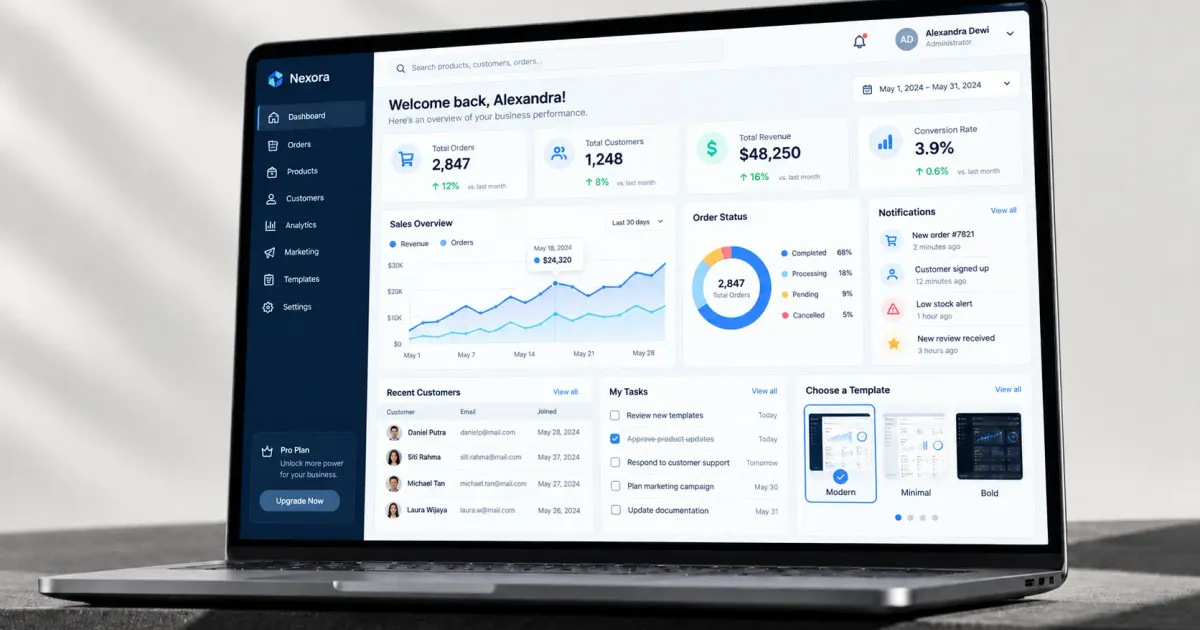
One wrong template decision can set your project back by months. Sounds dramatic, but it's a reality often experienced by teams that rush into picking an admin dashboard template just because it 'looks good' in the preview, without checking its code structure and flexibility more deeply.
This article is part of our complete guide to web app and admin dashboard development, covering must-have admin dashboard features and how to avoid the most common mistakes when choosing a template or designing one from scratch.
Table of Contents
- What Is an Admin Dashboard, Briefly
- Must-Have Features Every Admin Dashboard Needs
- How to Choose the Right Admin Dashboard Template
- Check the Code Structure, Not Just the Look
- Make Sure It's Compatible With Your Tech Stack
- Pay Attention to the Usage License
- Test Customization Ability From the Start
- Common Mistakes That Set Dashboard Projects Back by Months
- A Quick Checklist Before Choosing a Template
- Template vs Building From Scratch: Which Is Right?
- Examples of Dashboards We've Designed for Similar Needs
- A Performance Factor That's Often Overlooked
- Admin Dashboard Design Trends Worth Understanding, Not Just Following
- Frequently Asked Questions
- Is a free admin dashboard enough for a small business's needs?
- How long does it take to build an admin dashboard from a template?
- What's the difference between an admin dashboard and an admin panel?
- Does an admin dashboard need to be designed mobile-friendly?
- How many admin dashboard templates should you compare before deciding?
- If Your Dashboard Needs Are Specific
What Is an Admin Dashboard, Briefly
An admin dashboard is the user interface of a web app used by an internal team (not public visitors) to manage data and operations — viewing reports, managing content, monitoring user activity, and taking other administrative actions.
Must-Have Features Every Admin Dashboard Needs
- Authentication and access management — secure login, and the ability to restrict feature/data access based on user role (admin, editor, viewer).
- Clear, consistent navigation — a sidebar or menu that's easy to understand, especially for a dashboard with many modules.
- Data tables with sorting, filtering, and search — almost every admin dashboard needs to display data in a table format that can be processed quickly.
- Data visualization (charts/graphs) — a visual summary that helps understand trends without reading raw numbers one by one.
- Responsive across screen sizes — even though an admin dashboard is usually accessed from a desktop, the ability to access it from a tablet/phone still matters for flexibility.
- Notifications and activity logs — an audit trail of who made what change, important for accountability and troubleshooting.
How to Choose the Right Admin Dashboard Template
Check the Code Structure, Not Just the Look
A template that looks great in a demo could have messy code structure behind it — hard to customize, outdated dependencies, or minimal documentation. Always check its repository/source code (if available), not just the visual preview.
Make Sure It's Compatible With Your Tech Stack
Admin dashboard templates are usually built for a specific framework (React, Vue, Laravel, etc.). Make sure the template you choose is compatible with your development team's tech stack — mixing an incompatible template often ends up with more rework than just building from scratch.
Pay Attention to the Usage License
Some free templates have license restrictions (for example, personal projects only, no commercial use) that often go unread. Always check the license terms before integrating one into a business project.
Test Customization Ability From the Start
Try modifying one or two small components of the template before fully committing to it. If a simple modification already feels difficult or takes major effort, that's a signal the template may not be flexible enough for your future needs.
The right dashboard template speeds up development — the wrong one actually slows it down, even though it looked like a time-saver at first.
Common Mistakes That Set Dashboard Projects Back by Months
Back to the hook at the start of this article — how does one template decision actually lead to major delays? Here are scenarios that happen often:
- A template chosen without checking for outdated dependencies. Once the project is underway and a library needs updating for a new feature, it turns out the template's old version conflicts with the new library, forcing a major refactor midway through.
- A component structure too rigid for real customization needs. A template designed for generic use cases is often hard to modify for specific needs, forcing developers to rewrite components from scratch — defeating the very time-saving reason the template was chosen in the first place.
- Minimal documentation, or documentation the maker no longer maintains. A developer spends days just understanding how a component works, something that should've taken hours with clear documentation.
These three scenarios share a common thread: the problem only shows up once the project is already well underway, not at the start when the template was first chosen — that's exactly why a thorough evaluation upfront (not just looking at the visual preview) is so critical.
A Quick Checklist Before Choosing a Template
- ☐ Have you checked the source code/repository, not just the visual demo?
- ☐ Is it compatible with your development team's tech stack?
- ☐ Have you read the license terms and confirmed they fit your needs (commercial vs personal)?
- ☐ Have you tried a small modification to test customization flexibility?
- ☐ Is documentation available and still maintained (check the last update date)?
- ☐ Is there a community or support available if technical issues come up later?
Template vs Building From Scratch: Which Is Right?
A ready-made template suits relatively standard needs and a tight timeline — speeding up development since the base structure is already there. Building from scratch (custom) is a better fit if your dashboard needs are fairly unique, or if the templates available on the market genuinely don't fit after a thorough evaluation.
In practice, many projects use a hybrid approach — starting from a template as the foundation, then customizing deeply until the end result looks quite different from the original template. This often turns out to be the most efficient middle ground: the head start of a template, the flexibility of deep customization.
Examples of Dashboards We've Designed for Similar Needs
As a concrete example, we have design illustrations of admin dashboards for specific needs — such as an HR and attendance dashboard or an insurance claims dashboard.
A Performance Factor That's Often Overlooked
Beyond features and appearance, admin dashboard performance is often overlooked during the initial evaluation, even though it has a big impact on the daily productivity of the team using it. A dashboard with large data tables (thousands of rows) needs techniques like pagination or virtual scrolling to stay responsive — a template only designed for a demo with a few dozen rows of data may not have been tested against actual production-scale data.
Test the template with a data volume close to real conditions before deciding, not just sample data deliberately kept light for a demo. This is one of the most common blind spots — a template that feels fast with 20 rows of data can be very slow with 20,000 rows if it wasn't designed with scale in mind.
Admin Dashboard Design Trends Worth Understanding, Not Just Following
Dashboard design trends keep changing — dark mode, minimalist design with lots of white space, components with smooth animations. Worth remembering: these trends should be a secondary consideration after function. An admin dashboard gets used for hours by an internal team every day, so clarity and work efficiency matter far more than just following the latest visual trend, which might look nice but doesn't add any real productivity.
Before adopting a particular design trend, ask: does this actually help the team work faster and make fewer mistakes, or does it just make the dashboard 'look modern' with no clear functional benefit?
Frequently Asked Questions
Is a free admin dashboard enough for a small business's needs?
For simple needs and a small team, a free template with basic features can be enough. Once needs grow more complex (granular access rights, specific API integrations), it usually requires deeper customization that a free template doesn't always provide.
How long does it take to build an admin dashboard from a template?
Much faster than from scratch — it can be a matter of weeks for a dashboard with standard needs, depending on how much customization is needed from the base template.
What's the difference between an admin dashboard and an admin panel?
These terms are often used interchangeably with no strict distinction. If there is a nuance, 'dashboard' sometimes leans more toward data visualization (charts, summaries), while 'admin panel' sometimes leans more toward management functions (CRUD data, settings).
Does an admin dashboard need to be designed mobile-friendly?
Ideally yes, though it's usually a lower priority than desktop since most usage still happens from a computer at work. But for teams that often need to check data quickly from their phone (like a manager who travels a lot), a responsive layout still adds significant value.
How many admin dashboard templates should you compare before deciding?
3-5 candidates are usually enough for a reasonable comparison without taking too much time. Focus on candidates that have already passed the basic checklist (stack compatibility, clear license) before moving into a deeper evaluation of flexibility and performance.
If Your Dashboard Needs Are Specific
If no ready-made template fully fits your business's operational needs, our team at Altive Dev can help design a custom admin dashboard built from scratch around your specific workflow. Tell us about your needs, and we'll help map out the solution.



Comments
Got a question or feedback? Leave a comment!