Ms. Dewi runs an interior design service with a small team, three people including herself. Whenever a prospective client shows interest, she writes their contact down in her phone's notes app — name, phone number, a brief note on what they need. The problem is, during busy months, those notes pile up to dozens of entries, and she often forgets to follow up with a prospect who was interested two or three weeks earlier. Some of them eventually went with a competitor, not because of price or quality, but simply because they were never contacted again.
Stories like Ms. Dewi's are the main reason CRM (Customer Relationship Management) is one of the systems with the most direct impact on revenue, not just a 'nice to have'. This article is part of our complete guide to ERP, CRM, and business management systems.
Table of Contents
- What Is a CRM Application, Really?
- Core Features Found in Almost Every CRM Application
- Back to Ms. Dewi's Story: What Changed
- Types of CRM Applications by Business Scale
- CRM for Solopreneurs/Very Small Businesses
- CRM for Small-to-Medium Sales Teams
- CRM for Companies With a Complex Sales Process
- CRM vs the Manual Way: A Real Impact Comparison
- How to Roll Out CRM Adoption in a Team Used to the Manual Way
- Common Mistakes That Keep a CRM From Being Used to Its Full Potential
- Examples of Systems We've Designed for Similar Needs
- CRM for Sales vs CRM for Customer Service
- Signs Your Business Is Already Overdue for CRM
- Frequently Asked Questions
- Does a very small business with one salesperson still need a CRM?
- Is there a free CRM app good enough for a small business?
- How long does it take a team to get comfortable with a new CRM?
- Can a CRM integrate with WhatsApp Business?
- Is customer data in a CRM safe when a salesperson resigns?
- Also Read
What Is a CRM Application, Really?
A CRM application is a system that helps a business manage every interaction with prospects and existing customers — from first contact, communication history, negotiation status, all the way to completed transactions. In essence: making sure no prospect 'falls through the cracks' just because their information got lost.
Core Features Found in Almost Every CRM Application
- Centralized contact management — all prospect and customer data stored in one place, accessible to everyone on the team who needs it.
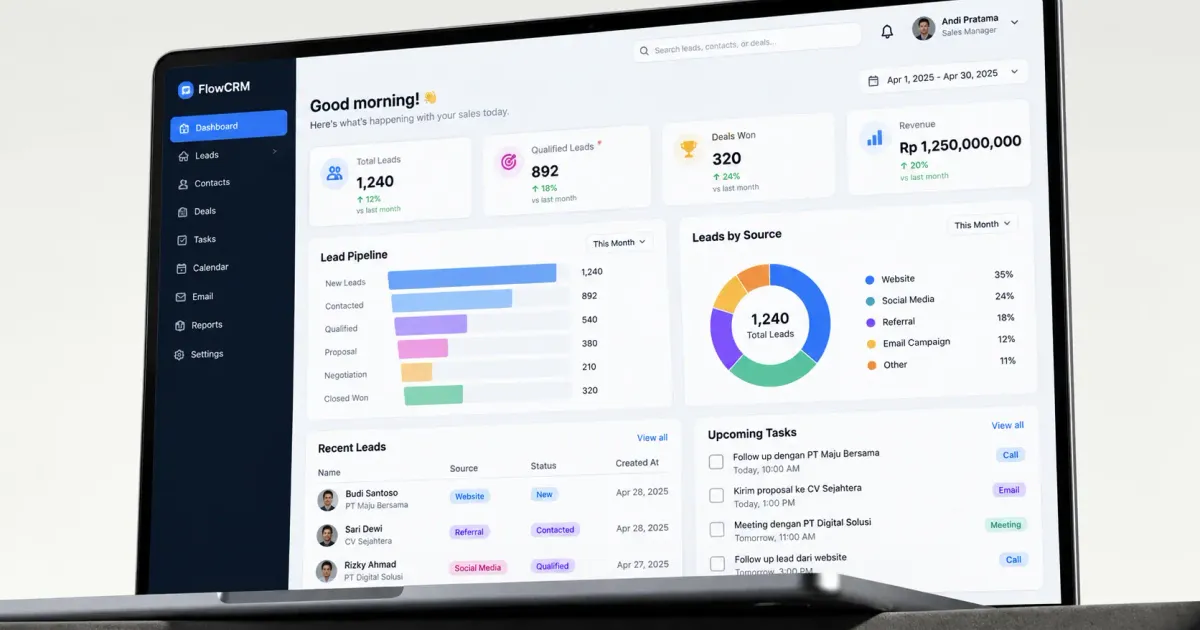
- A sales pipeline — a visualization of each prospect's negotiation stage (initial contact, presentation, negotiation, closing), helping the team know follow-up priorities.
- Automatic follow-up reminders — notifications so no lead is forgotten, exactly the problem Ms. Dewi ran into.
- Communication history — a record of every interaction (calls, email, chat) with each contact, so anyone on the team who reaches out can see the prior context.
- Sales performance reports — conversion data, average time to close, and each sales team member's performance.
Back to Ms. Dewi's Story: What Changed
After realizing she'd already lost several potential clients simply from forgetting to follow up, Ms. Dewi started using a simple CRM app. Now, every new prospect automatically enters the system with a scheduled follow-up reminder — 3 days after first contact if there's no response yet, then 7 days if there's still no follow-through.
The change she noticed most wasn't just about no longer forgetting follow-ups, but also about data. She can now see where most of the clients who actually close come from (referrals vs social media vs online search), information she'd never tracked at all before since everything was scattered in her phone's notes app.
A good CRM doesn't just store customer data — it helps you know when and how to act.
Types of CRM Applications by Business Scale
CRM for Solopreneurs/Very Small Businesses
Simple needs: contact records, follow-up reminders, basic communication history. Many free or very affordable options are enough at this scale.
CRM for Small-to-Medium Sales Teams
Needs a visual pipeline and team collaboration features — so a manager can see every lead's progress without having to ask each salesperson individually.
CRM for Companies With a Complex Sales Process
Needs deeper integration — email marketing automation, automatic lead scoring, integration with other systems like ERP for closed transaction data.
CRM vs the Manual Way: A Real Impact Comparison
To understand CRM's impact more concretely, compare two approaches to managing leads. The manual way (spreadsheet or notes): data easily gets scattered, hard to know which lead is highest priority without checking each one manually, and no automatic notification when a lead has been neglected too long. The CRM way: data is centralized and structured, a visual pipeline immediately shows which leads need urgent attention, and the system automatically reminds you before a lead goes completely 'cold'.
The impact most commonly reported by CRM users after switching from the manual way: lead-to-customer conversion rates go up, not because the product quality changed, but because fewer leads fall through the cracks due to a missed follow-up. This lines up with Ms. Dewi's experience — the problem wasn't the service or its price, it was the consistency of a follow-up process that used to rely entirely on human memory.
How to Roll Out CRM Adoption in a Team Used to the Manual Way
The transition from manual methods to CRM often fails not because the system is bad, but because of how it's introduced to the team. A few steps that help smooth out adoption:
- Start with the data actually used day-to-day, rather than migrating all historical data at once from the start.
- Show the team a concrete benefit from the first week — for example, how many leads were 'caught' needing a follow-up that would've previously slipped through.
- Keep the data-entry process as simple as possible at first, adding complexity (extra fields, category tags) gradually once the team is comfortable.
- Appoint one person as the 'CRM champion' responsible for monitoring data compliance and helping teammates who struggle with it.
Common Mistakes That Keep a CRM From Being Used to Its Full Potential
- The sales team doesn't enter data consistently, so the CRM becomes inaccurate and eventually gets abandoned.
- Too many required fields, making data entry feel like a hassle the team avoids.
- No one is responsible for monitoring and enforcing discipline around CRM use in the early stages of adoption.
- Choosing a CRM with excessive features for simple needs, creating a learning curve that didn't need to be that steep.
These mistakes share a common thread: a CRM is only as effective as the team's consistency in using it. Even the most sophisticated system is useless if its data never gets updated.
Examples of Systems We've Designed for Similar Needs
As a concrete example, we have a design illustration of a system for CRM with a complex sales pipeline — covering contact management, negotiation stages, and performance reporting in one platform.
CRM for Sales vs CRM for Customer Service
Some people assume CRM is only relevant for sales teams, but it's just as valuable for customer service teams. A sales CRM focuses on the pipeline and converting leads into new customers. A customer service CRM focuses on existing customers' interaction history — past complaints, product preferences, purchase history — so the support team can offer more personal service without having to ask again for information that should already be on record.
Ideally, both functions connect within the same CRM system — the sales team can see a customer's complaint history before offering a new product, and the support team can see purchase history to provide a more relevant solution. Splitting data between these two functions across different systems is often the source of a customer experience that feels disjointed.
Signs Your Business Is Already Overdue for CRM
Beyond having too many leads to remember manually, here are a few other signs your business is actually already a bit overdue for CRM adoption:
- Two salespeople often end up contacting the same prospect without knowing it, creating an unprofessional impression.
- There's no easy way to know the total potential sales value (pipeline value) currently in progress.
- When a sales team member resigns, their contact data and communication history disappears or becomes hard to track down.
- Monthly sales reports are put together manually by gathering info from each salesperson one by one.
If any of these signs sound familiar, that means the cost of 'delaying' CRM adoption is already bigger than the cost of the subscription itself — in the form of lost leads and team time wasted on administrative work that could've been automated.
Frequently Asked Questions
Does a very small business with one salesperson still need a CRM?
Strongly recommended once the number of leads needing follow-up exceeds what's easy to remember — usually above 10-15 active leads at a time.
Is there a free CRM app good enough for a small business?
There are a few options with a free tier that's enough for basic needs, though usually with a contact limit or restricted automation features — a similar freemium pattern common in POS apps too.
How long does it take a team to get comfortable with a new CRM?
For basic use, usually 1-2 weeks to adapt. More advanced features (automation, complex reports) take longer to genuinely master and use to full effect.
Can a CRM integrate with WhatsApp Business?
Many modern CRMs targeting the Indonesian market already offer WhatsApp integration, since it's the main communication channel many businesses here use with their customers. Check for this feature's availability if it's your business's primary communication channel.
Is customer data in a CRM safe when a salesperson resigns?
As long as CRM access is managed through a company account (not each salesperson's personal account) and access is revoked promptly after they resign, customer data stays safe and can be handed off to their replacement without losing communication history — one of CRM's key advantages over each salesperson's personal notes.
Also Read
If your business's sales process is unique enough that a generic CRM doesn't fully cover it, our team at Altive Dev can help design a custom CRM system. Tell us about your needs, and we'll help map out the solution.



Comments
Got a question or feedback? Leave a comment!