
Having your own website is no longer complicated or expensive. Whether you want to build a personal portfolio, a blog, a business profile, or an online store, there are now many ways to make it happen — from free drag-and-drop platforms, a CMS like WordPress, manual coding from scratch, to using AI assistance.
The question is no longer "can I build my own website?", but how to build a website that best fits your needs, time, and technical ability. This article covers building a website from scratch in full, step by step, so you don't end up picking the wrong platform partway through.

Table of Contents
- Why Do You Need a Website in 2026?
- Step 1: Decide Your Website's Purpose
- Step 2: Choose the Right Way to Build Your Website
- 1. Website Builder (No Coding)
- 2. A CMS like WordPress
- 3. Manual Coding (HTML/CSS)
- 4. AI Assistance
- Step 3: Register a Domain
- Step 4: Set Up Hosting
- Step 5: Build Out Content and Page Structure
- Step 6: Pay Attention to Design and Branding
- Step 7: Basic SEO Optimization
- Step 8: Test and Publish
- Step 9: Maintain the Website After Publishing
- Building Your Own Website: No Coding vs. With Coding
- Common Beginner Mistakes When Building a Website
- When Should You Use a Professional Service?
- Frequently Asked Questions (FAQ)
- Conclusion
Why Do You Need a Website in 2026?
Before getting into the technical steps, it's worth understanding why a website is still relevant amid the dominance of social media:
- Credibility — a website makes a business or personal brand look more professional than relying only on an Instagram or TikTok account.
- Full control — unlike social media, whose rules can change anytime, a website is a digital asset you fully control.
- Discoverable through Google — a well-optimized website can bring in new visitors every day without you constantly needing to post content.
- A long-term foundation — a website can grow alongside your business, from a simple profile into a full online store.
For these reasons, knowing how to build your own website has become a genuinely valuable skill, for personal needs and business alike.
Step 1: Decide Your Website's Purpose
This is the foundation of the entire process of building a website from scratch. Before choosing a platform or tool, first decide what this website is for:
- Personal portfolio — showcasing work, an online CV, or personal branding.
- Blog — regularly sharing writing, opinions, or educational content.
- Business profile (company profile) — showcasing services, products, and contact information.
- Online store (e-commerce) — selling products directly through the website.
If you're launching a new product, a simple website can also be part of early validation — read more about what an MVP for a startup is to understand the concept.
This purpose determines exactly which features you actually need, and keeps you from picking a platform that's too complicated — or too limited — for your real needs. Many beginners get stuck choosing a platform that's "supposedly great" when its features go way beyond what they need, or the opposite, one that's too simple and forces a platform switch down the line.
Step 2: Choose the Right Way to Build Your Website
There are four main paths you can choose from. Each has its own advantages and drawbacks.
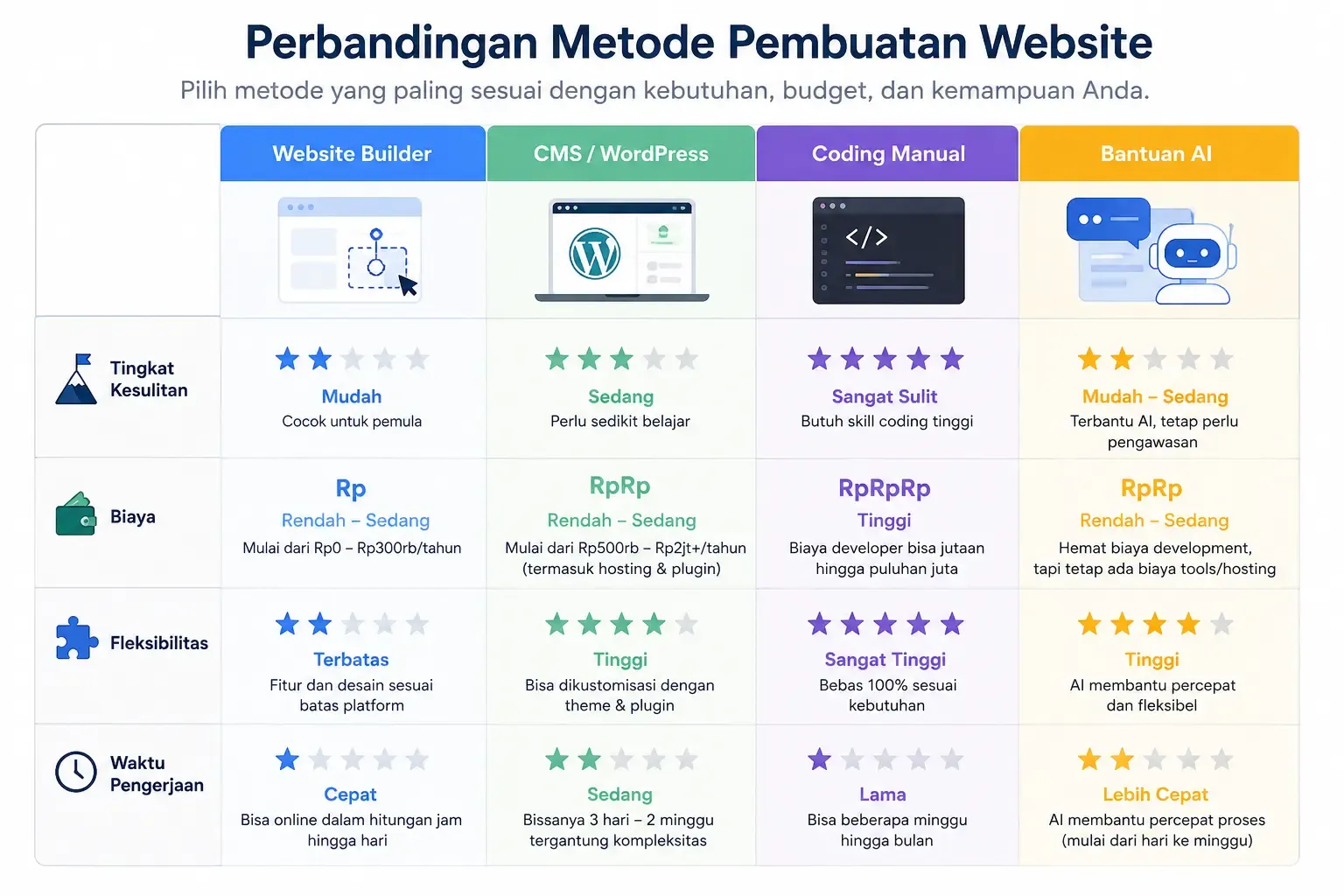
1. Website Builder (No Coding)
Platforms like Google Sites, Canva, or Wix let you build pages through drag-and-drop without writing any code. This is the friendliest way to build a website for beginners, since you just drag elements (text, images, buttons) into the position you want.
Advantages:
- No technical skill needed at all
- Can be published in a matter of hours
- Hosting is usually already included in the plan
Drawbacks:
- Design customization is limited compared to manual coding
- Some advanced features are usually paid
Good for beginners and simple needs. Read the specific guide at how to build a website on Google Sites.
2. A CMS like WordPress
WordPress is one example of a Content Management System (CMS), one of the most popular in the world. A CMS gives you far more flexibility — thousands of themes and plugins are available, great for a blog or business website that will keep growing. It's the middle path between the ease of a website builder and the full control of manual coding.
Advantages:
- Very flexible with thousands of plugins (SEO, security, e-commerce, etc)
- Great for a website that will keep being developed
- A large community, so tutorials or help are easy to find
Drawbacks:
- Takes a bit of time to learn upfront
- Needs separate hosting and domain (self-hosted)
See the detailed steps in our how to build a website with WordPress.
3. Manual Coding (HTML/CSS)
For full control over every detail of appearance and performance, some people choose to write their own code. This is building a website from scratch in the most literal sense — you build every line of the website's structure and style yourself.
Advantages:
- Full control over design and performance
- Not dependent on any particular platform's limitations
- The website tends to be lighter and faster
Drawbacks:
- Takes longer to learn
- Requires understanding HTML, CSS, and ideally JavaScript
The introductory guide is at how to build a website with HTML.
4. AI Assistance
A newer, increasingly popular approach: using AI to automatically generate a website's basic structure and content, then refining it manually. This method speeds up the process dramatically, especially for creating an initial draft of the design and copywriting — similar to the trend of AI automation for business being adopted more and more lately.
Advantages:
- Very fast for generating an initial draft
- Helps those who struggle to start from a blank page
- Can be combined with a builder or manual coding
Drawbacks:
- AI output still needs editing to match your brand
- Quality depends on the AI platform used
Read the details in our how to build a website with AI.
Step 3: Register a Domain
A domain is your website's address, for example yourbusiness.com. It's the digital identity people will remember, so choosing it shouldn't be careless.
Tips for choosing a domain name:
- Choose something short and easy to remember
- Match your brand or business name
- Avoid confusing numbers or hyphens
- Prioritize the
.comextension if available, or.idfor the Indonesian market
Most hosting providers or website builders offer domain registration bundled directly into one package. Make sure you personally hold access to the registration account, not someone else — this matters so you don't lose control of the website later on.
Step 4: Set Up Hosting
Hosting is where your website's files are stored so they can be accessed over the internet anytime.
- If you use a website builder or free platform, hosting is usually already included automatically — you don't need to handle it separately.
- If you use self-hosted WordPress or manual HTML, you need to buy separate hosting from a provider like Niagahoster, Hostinger, or similar.
A few things to pay attention to when choosing hosting:
- Server speed — directly affects visitor experience and SEO
- Uptime — the percentage of time the server stays up without interruption (ideally 99.9%)
- Technical support — especially important for beginners just learning to build their own website
- Scalability — whether the plan can be upgraded as traffic grows
Step 5: Build Out Content and Page Structure
A clear navigation structure keeps visitors around and helps them easily find what they're looking for. For most beginner websites, these four core pages are enough:
- Home — a brief introduction and navigation pointing to other pages
- About — who you or your business are, the story behind it
- Services/Products — what's offered, clearly and specifically
- Contact — how to reach you (email, WhatsApp, contact form)
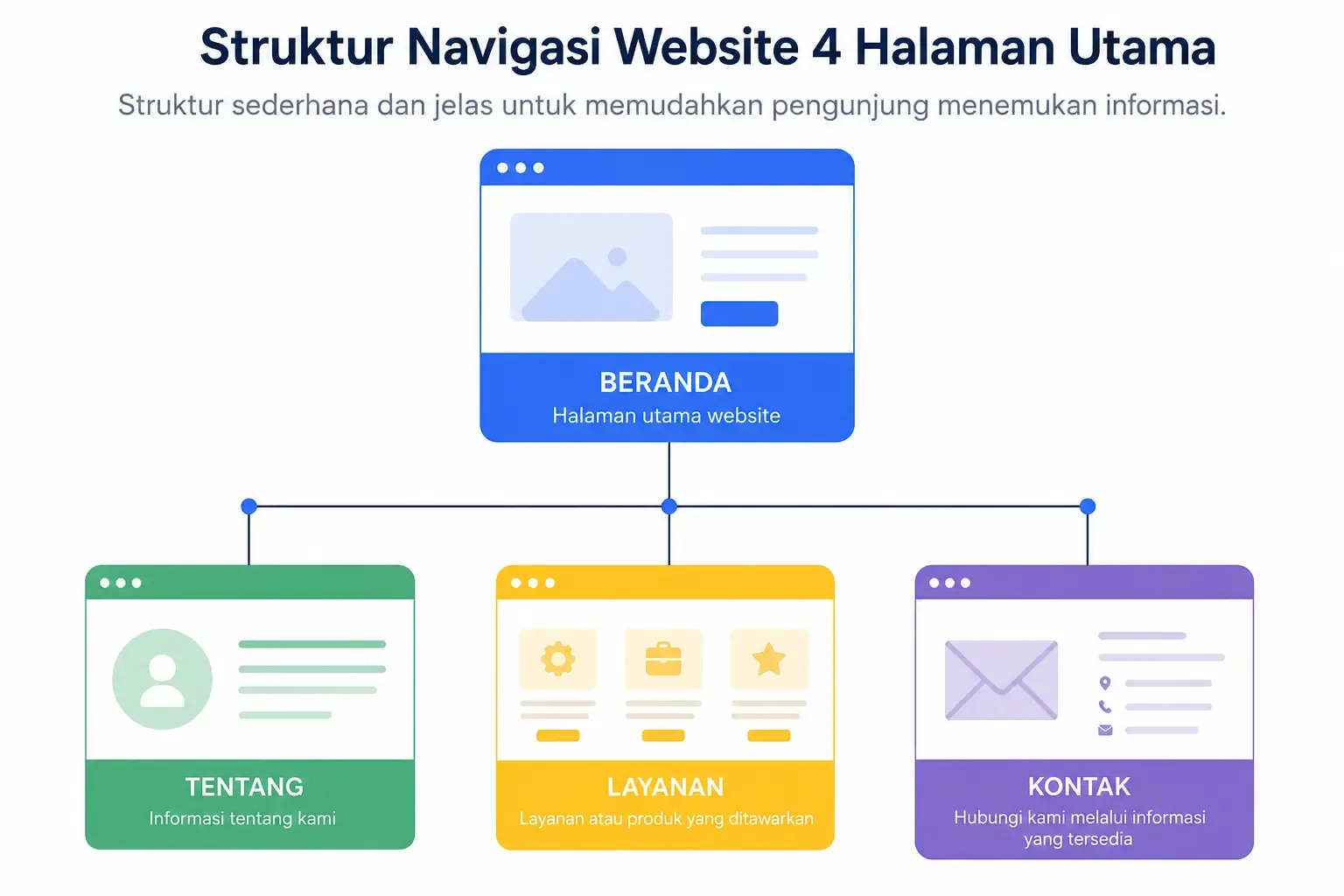
Keep the navigation structure simple at first — 4-6 main menu items at most is enough for most beginner needs. Too many menu items can actually confuse visitors and hurt the user experience.
Step 6: Pay Attention to Design and Branding
Design isn't just about aesthetics — it's about how visitors perceive your credibility within seconds.
- Be consistent with brand colors — pick 2-3 main colors and use them consistently
- Easy-to-read typography — avoid overly decorative fonts for long text
- White space — don't cram the page full of elements, give it room to breathe
- Quality images — use real photos or high-resolution stock photos, avoid blurry images
Step 7: Basic SEO Optimization
To help your website get found through Google, apply SEO basics from the start:
- Use a clear page title (title tag) that includes relevant keywords
- Write an engaging meta description for every page
- Make sure every image has descriptive alt text
- Create a heading structure (H1, H2, H3) that's clean and logical
- Make sure the website is mobile-friendly, since most visitors access it via phone

Step 8: Test and Publish
Before the website officially goes live, do a thorough check:
- Check the view on a phone screen, not just a laptop
- Make sure every link and button works
- Check the page load speed
- Test the contact form — make sure messages actually get sent
- Check spelling and grammar across all content
Only publish after everything above has been checked. A website rushed into publishing without testing often leaves a bad first impression on visitors.
Step 9: Maintain the Website After Publishing
Building a website doesn't stop at the "publish" button. A website needs regular upkeep to stay relevant and secure:
- Update content regularly — outdated information hurts visitor trust
- Regular backups — especially if using self-hosted WordPress
- Monitor speed and security — use tools like Google PageSpeed Insights
- Analyze traffic — install Google Analytics to understand visitor behavior
Building Your Own Website: No Coding vs. With Coding
One of the most common questions from beginners is whether they need to learn to code first. Here's a quick comparison:
Aspect | No Coding (Builder/CMS) | With Coding (HTML/CSS) |
|---|---|---|
Learning time | Fast, a matter of hours | Longer, weeks to months |
Design flexibility | Limited to templates | Fully free |
Upfront cost | Generally more affordable | Can be cheaper long-term |
Best for | Beginners, fast needs | Those who need full control |
There's no single right answer — it all comes down to your needs, time, and long-term goals.
Common Beginner Mistakes When Building a Website
To make your process of building a website from scratch go more smoothly, avoid these mistakes:
- Choosing a platform without research — just because it's "supposedly great" without considering your own needs
- Too many elements on one page — makes the website feel heavy and confusing
- Ignoring the mobile view — even though most traffic comes from smartphones
- Forgetting to optimize speed — large images without compression are a common cause of slow websites
- Not testing before publishing — broken links or non-working forms damage visitor trust
When Should You Use a Professional Service?
Building your own website is entirely possible for simple needs. But if your business needs a genuinely professional look, complex features, or you don't have time to learn, considering a website development service is a sensible choice — especially if this website will become your main channel for acquiring customers.
Before deciding, it's worth first understanding how to choose a professional website development service so the outcome matches your expectations. For small business owners, there's also the website development service for small businesses and affordable website development service options which are more budget-friendly, or if you're based in a specific city you can look for a local provider like our Jakarta website development service or Bandung website development service.
A few signs you might need professional help:
- The website needs custom features (a booking system, complex payment integration, etc)
- You don't have time to learn a new platform
- The launch timeline is very tight
- The website's look will be the main representation of your brand to major prospective clients
There's no single "most correct" way to build a website — there's only the way that best fits your current time, budget, and goals.
Frequently Asked Questions (FAQ)
Is building a website hard for beginners? Not as hard as it used to be. Modern website builders are specifically designed so beginners can build a functional website in hours, not weeks.
What's the minimum cost to have a website? It can start from free (using the platform's default subdomain), but for your own domain and a more professional look, budget at least a few hundred thousand rupiah per year. For a more detailed picture including professional service costs, read the cost of building a business website in Indonesia.
Do I need to learn to code first? Not required. Website builders and a CMS like WordPress are designed to be usable with zero coding.
Which type of website is best for beginners? If your needs are very simple, start with a free website builder. If you're planning to grow into a serious business, consider WordPress or a website development service from the start so you don't need to rebuild later.
How long does it take to build a website from scratch? With a website builder, a simple website can be finished in 1-2 days. With WordPress, it usually takes 3-7 days including customization. With manual coding, the time depends on the complexity and your skill level.
Is a free website builder enough for a small business? Enough for the early stage, especially for testing a business idea. But as the business grows, its own domain and additional features (usually paid) are typically needed — at this point, many small business owners start considering our website development service for small businesses for a more polished result.
Conclusion
Building a website in 2026 is far easier than it was a few years ago. You can choose whichever path fits best — from a no-code website builder, a CMS like WordPress, manual coding for full control, to using AI assistance to speed up the process.
What matters most isn't which platform is "the most advanced", but which one best fits your current goals, time, and technical ability. Start small: decide on a purpose, choose a platform, register a domain, and build a simple content structure. A good website doesn't have to be perfect from day one — what matters is that you start, then keep refining it over time.


Comments
Got a question or feedback? Leave a comment!